Chapter 9 Touch Sensor
ESP32-S3 offers up to 14 capacitive touch GPIO, and as you can see from the previous section, mechanical switches are prone to jitter that must be eliminated when used, which is not the case with ESP32-S3’s builtin touch sensor. In addition, on the service life, the touch switch also has advantages that mechanical switch is completely incomparable.
Project 9.1 Read Touch Sensor
This project reads the value of the touch sensor and prints it out.
Component List
ESP32-S3-WROOM x1
GPIO Extension Board x1
830 Tie-Points Breadboard x1
Jumper Wire x1
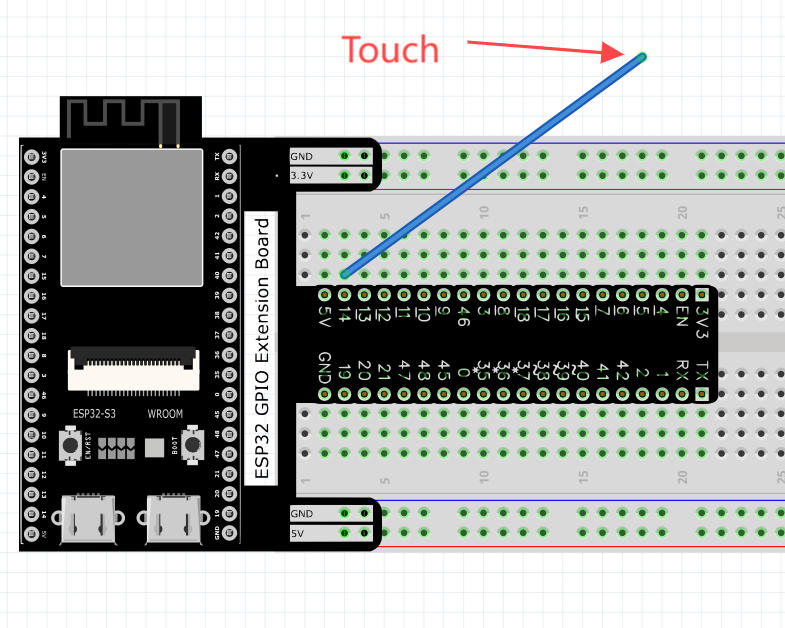
Connect

Sketch
Sketch_09.1_TouchRead

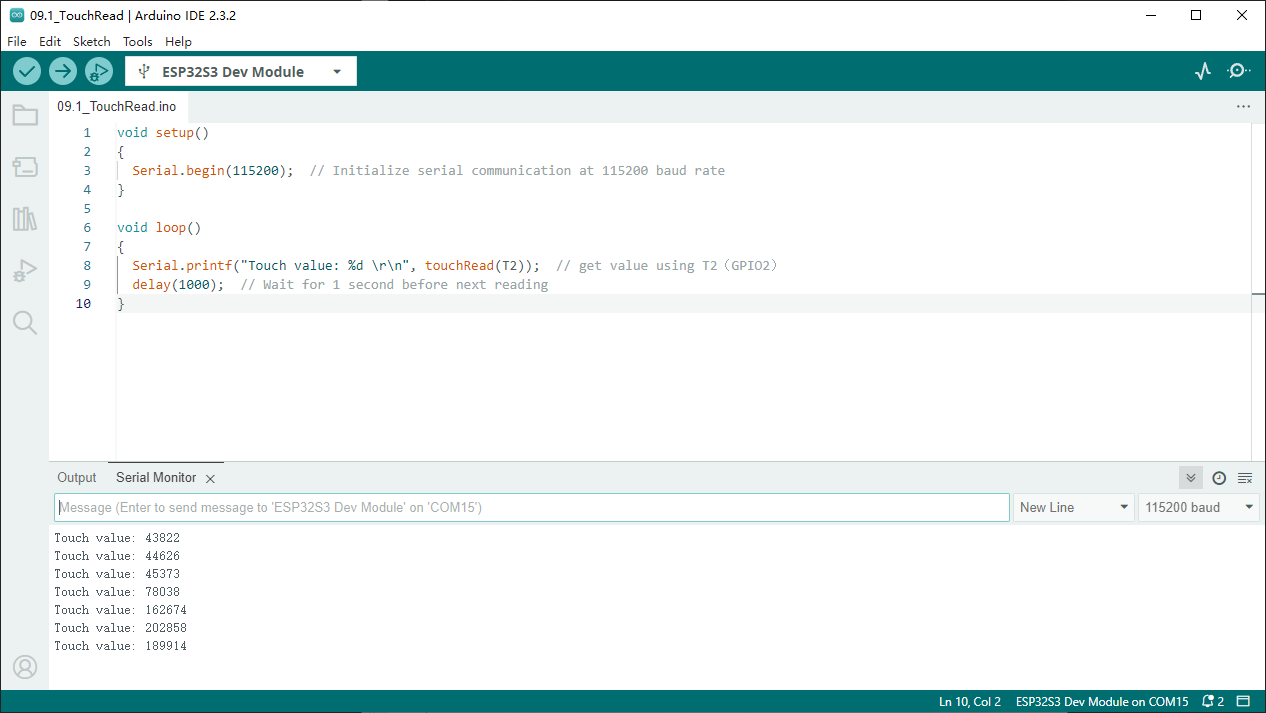
Download the code to ESP32-S3 WROOM, open the serial monitor, and set the baud rate to 115200. Touch jumper with hand. As shown in the following figure
The touch value will change after touching the jumper
Project 9.2 Touch Lamp
In this project, we will use ESP32-S3’s touch sensor to create a touch switch lamp.
Component List
ESP32-S3-WROOM x1
GPIO Extension Board x1
830 Tie-Points Breadboard x1
LED x1
Resistor 220Ω x1
Jumper Wire x3
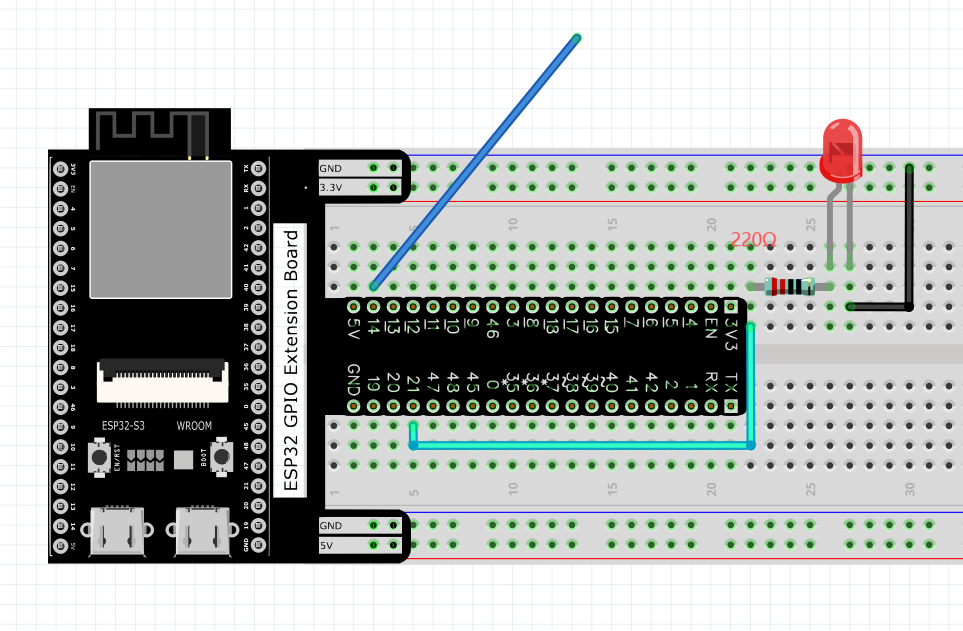
Connect
Sketch
Sketch_09.2_TouchLamp

Download the code to ESP32-S3 WROOM, open the serial monitor, and set the baud rate to 115200. Touch jumper with hand. As shown in the following figure,
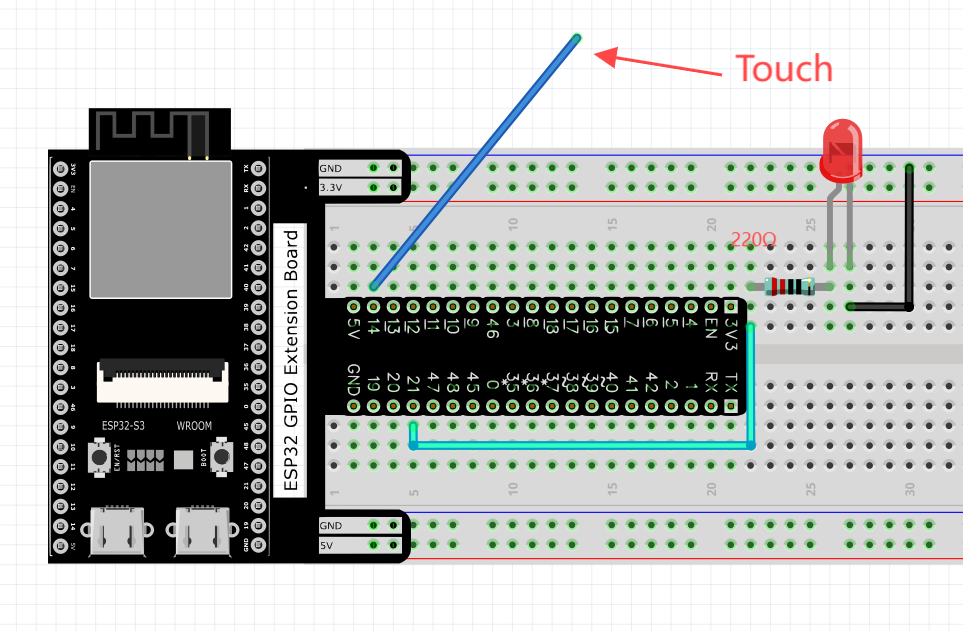

With a touch pad, the state of the LED changes with each touch, and the detection state of the touch sensor is printed in the serial monitor.
Code
The following is the program code:
#define PIN_LED     21         // Define the LED pin
#define TOUCH_PIN   14          // Use a valid touch pin on ESP32-S3
#define RELEASE_VAL 60000      // This threshold may need adjustment
#define PRESS_VAL   100000      // This threshold may need adjustment

bool isProcessed = false;      // Flag to track if touch event has been processed

void setup() {
Serial.begin(115200);        // Initialize serial communication
pinMode(PIN_LED, OUTPUT);    // Set LED pin as output
}

void loop() {
int touchValue = touchRead(TOUCH_PIN);  // Read touch sensor value
Serial.println(touchValue);  // Print touch value for debugging

if (touchValue > PRESS_VAL) {  // Note: Lower value indicates touch
    if (!isProcessed) {          // If touch hasn't been processed yet
    isProcessed = true;        // Mark as processed
    Serial.println("Touch detected!");
    reverseGPIO(PIN_LED);      // Toggle LED state
    }
}
if (touchValue < RELEASE_VAL) {  // Touch released
    if (isProcessed) {             // If a touch was previously processed
    isProcessed = false;         // Reset processed flag
    Serial.println("Released!");
    }
}

delay(50);  // Short delay to prevent too frequent readings
}

void reverseGPIO(int pin) {
digitalWrite(pin, !digitalRead(pin));  // Toggle the state of the given pin
}