Chapter 22 Play SD card music
In the previous study, we have learned how to use the SD card, and then we will learn to play the music in the SD card.
Project 22.1 SDMMC Music
In this project, we will read an mp3 file from an SD card, decode it through ESP 32-S3, and use a speaker to play it.
Component List
ESP32-S3-WROOM x1
GPIO Extension Board x1
830 Tie-Points Breadboard x1
NPN transistor(S8050) x2
Speaker x1
Diode x1
Resistor 1kΩ x1
Jumper Wire x4
Component knowledge
Speaker
Connect
Please note that before connecting the USB cable, please put the music into the SD card and insert the SD card into the card slot on the back of the ESP32-S3.

Sketch
How to install the library In this project, we will use the ESP8266Audio.zip library to decode the audio files in the SD card, and then output the audio signal through GPIO. If you have not installed this library, please follow the steps below to install it. open .
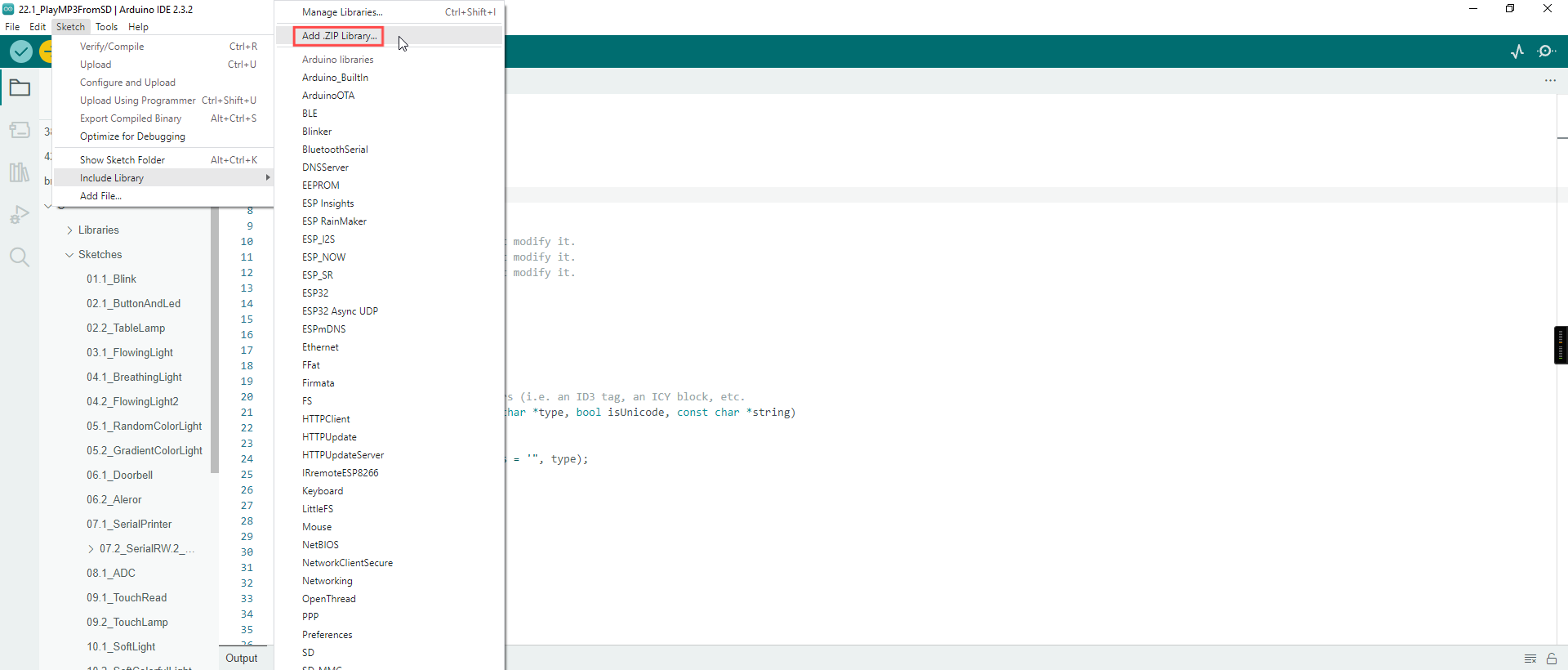
In the new pop-up window, select Super_Starter_Kit_for_ESP32_S3/C/Libraries/ESP8266Audio.zip. Then click “Open“.

Sketch_22.1_PlayMP3FromSD
We placed a folder called “music” in Super_Starter_Kit_for_ESP32_S3/Sketches/Sketch_22.1_PlayMP3FromSD User needs to copy this folder to SD card.

Click upload.

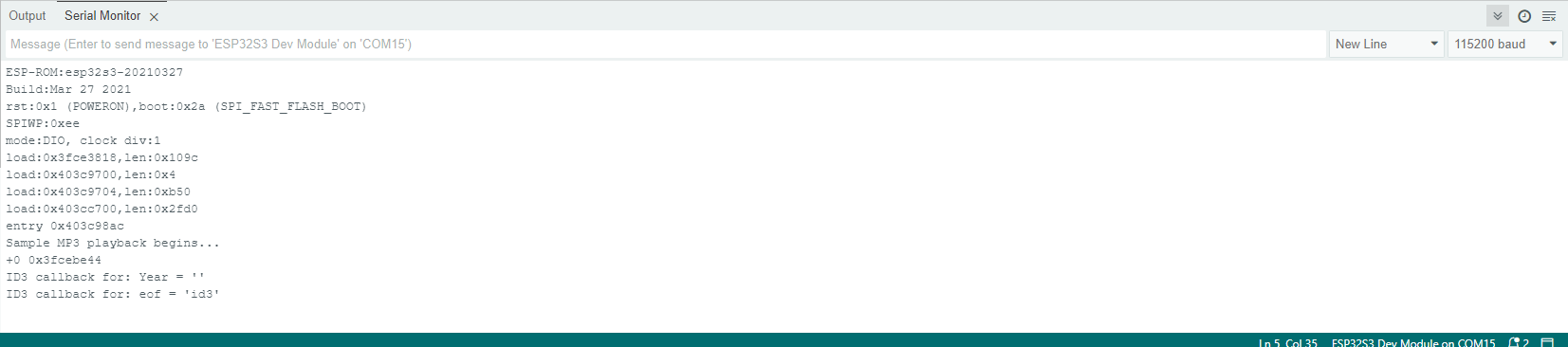
Compile and upload the code to the ESP32-S3 WROOM and open the serial monitor. ESP32-S3 takes a few seconds to initialize the program. When you see the message below, it means that ESP32-S3 has started parsing the mp3 in sd and started play ing music through Pin.
Code
The following is the program code:
#include <Arduino.h>
#include <WiFi.h>
#include "FS.h"
#include "SD_MMC.h"
#include "AudioFileSourceSD_MMC.h"
#include "AudioFileSourceID3.h"
#include "AudioGeneratorMP3.h"
#include "AudioOutputI2SNoDAC.h"

#define SD_MMC_CMD 38 //Please do not modify it.
#define SD_MMC_CLK 39 //Please do not modify it.
#define SD_MMC_D0  40 //Please do not modify it.

AudioGeneratorMP3 *mp3;
AudioFileSourceID3 *id3;
AudioOutputI2SNoDAC *out;

AudioFileSourceSD_MMC *file = NULL;

// Called when a metadata event occurs (i.e. an ID3 tag, an ICY block, etc.
void MDCallback(void *cbData, const char *type, bool isUnicode, const char *string)
{
(void)cbData;
Serial.printf("ID3 callback for: %s = '", type);

if (isUnicode) {
    string += 2;
}

while (*string) {
    char a = *(string++);
    if (isUnicode) {
    string++;
    }
    Serial.printf("%c", a);
}
Serial.printf("'\n");
Serial.flush();
}

void setup()
{
WiFi.mode(WIFI_OFF);
Serial.begin(115200);
delay(1000);
SD_MMC.setPins(SD_MMC_CLK, SD_MMC_CMD, SD_MMC_D0);
if (!SD_MMC.begin("/sdcard", true, true, SDMMC_FREQ_DEFAULT, 5)) {
    Serial.println("Card Mount Failed");
    return;
}
Serial.printf("Sample MP3 playback begins...\n");

audioLogger = &Serial;
file = new AudioFileSourceSD_MMC("/music/01.mp3");
id3 = new AudioFileSourceID3(file);
id3->RegisterMetadataCB(MDCallback, (void*)"ID3TAG");
//out = new AudioOutputI2S();
out = new AudioOutputI2SNoDAC();
out->SetPinout(12,13,14);//Set the audio output pin, Only 14 were used
out->SetGain(3.5);//Setting the Volume
mp3 = new AudioGeneratorMP3();
mp3->begin(id3, out);
}

void loop()
{
if (mp3->isRunning()) {
    if (!mp3->loop()) mp3->stop();
} else {
    Serial.printf("MP3 done\n");
    delay(1000);
}
}