Chapter 0 LED
Description
This chapter is the Start Point in the journey to build and explore ESP32-S3 WROOM electronic projects. We will start with simple “Blink” project.
Project 0.1 Blink
In this project, we will use ESP32-S3 WROOM to control blinking a common LED
Component List
ESP32-S3-WROOM x1
Type C USB Cable x1
Power
ESP32-S3 WROOM needs 5v power supply. In this tutorial, we need connect ESP32-S3 WROOM to computer via USB cable to power it and program it. We can also use other 5v power source to power it.

Sketch
According to the circuit, when the GPIO2 of ESP32-S3 WROOM output level is high,
the LED turns ON. Conversely, when the GPIO2 ESP32-S3 WROOM output level is low,
the LED turns OFF. Therefore, we can let GPIO2 circularly output high and low level
to make the LED blink.
Upload the following Sketch: LAFVIN_Super_Starter_Kit_For_Esp32_S3\Sketches\01.1_Blink
Next we will introduce two ways to upload code to ESP32-S3 WROOM.
Option 1: Connect ESP32-S3 WROOM to computer.
Open Arduino IDE 2.0.0. Click Tools->Upload Mode. Select UART0 / Hardware CDC.

Before uploading the code, click “Tools”, “Board” and select “ESP32S3 Dev Module”.

Select the serial port. Note that the computer port number of each user may be different. Please select the correct serial port according to your computer. Taking the window system as an example, my computer recognizes that the communication interface of the ESP32-S3-WROOM is COM3, so I select COM3.
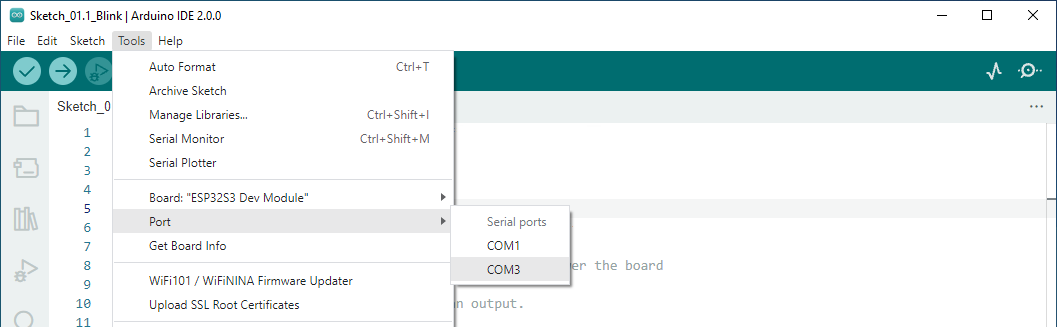
Note
Note: For macOS users, if the uploading fails, please set the baud rate to 115200 before clicking “Upload Using Programmer”.

Click the Upload button and it will compile and upload the Sketch to the ESP32-S3-WROOM.

Wait for the Sketch upload to complete, and observe the ESP32-S3-WROOM. You can see that the blue LED (IO2) on the board flashes cyclically.

Option 2: Connect ESP32-S3 WROOM to computer.

Open Arduino IDE 2.0.0. Click Tools->Upload Mode. Select USB-OTG CDC(TinyUSB).

Select the serial port. Note that the computer port number of each user may be different. Please select the correct serial port according to your computer. Taking the window system as an example, my computer recognizes that the communication interface of the ESP32-S3-WROOM is COM25, so I select COM25.

Click the Upload button and it will compile and upload the Sketch to the ESP32-S3-WROOM.
Wait for the Sketch upload to complete, and observe the ESP32-S3-WROOM. You can see that the blue LED (IO2) on the board flashes cyclically.
Code
The following is the program code:
#define LED_BUILTIN  2
// the setup function runs once when you press reset or power the board
void setup() {
// initialize digital pin LED_BUILTIN as an output.
pinMode(LED_BUILTIN, OUTPUT);
}

// the loop function runs over and over again forever
void loop() {
digitalWrite(LED_BUILTIN, HIGH);   // turn the LED on (HIGH is the voltage level)
delay(1000);                       // wait for a second
digitalWrite(LED_BUILTIN, LOW);    // turn the LED off by making the voltage LOW
delay(1000);                       // wait for a second
}